如何使用微信小程序的提示框?
这篇文章是教大家如何使用微信小程序的提示框?教程简单易学,有需要的小伙伴就赶紧和小编一起来学习一下吧。
比较简单 直接上码
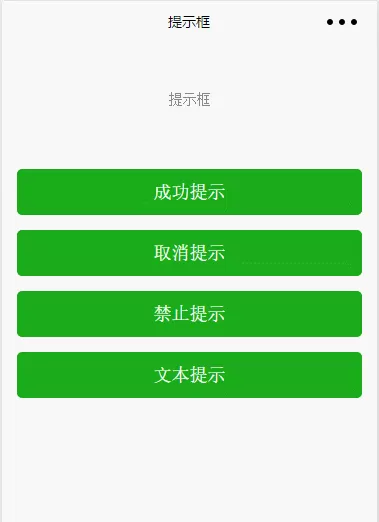
Toast框
提示框
成功提示
取消提示
禁止提示
文本提示
复制代码
js
const App = getApp()
Page({
data: {},
onLoad() {
this.$wuxToast = App.wux(this).$wuxToast
},
showToast() {
const _this =this;
_this.$wuxToast.show({
type: \'success\',
timer: 1500,
color: \'#fff\',
text: \'已完成\',
// 成功之后的返回,想当于下面的success
success: () => console.log(\'已完成\')
// success: function(){
// console.log(\'已完成\')
// }
})
},
showToastCancel() {
const _this =this;
_this.$wuxToast.show({
type: \'cancel\',
timer: 1500,
color: \'#fff\',
text: \'取消操作\',
success: () => console.log(\'取消操作\')
})
},
showToastErr() {
const _this =this;
_this.$wuxToast.show({
type: \'forbidden\',
timer: 1500,
color: \'#fff\',
text: \'禁止操作\',
success: () => console.log(\'禁止操作\')
})
},
showToastText() {
const _this =this;
_this.$wuxToast.show({
type: \'text\',
timer: 1500,
color: \'#fff\',
text: \'文本内容\',
success: () => console.log(\'文本内容\')
})
},
})
复制代码
注意点
在app.js中要引入wxui
import wux from \'components/wux\'
App({
onLaunch() {
console.log(\'onLaunch\')
},
onShow() {
console.log(\'onShow\')
},
onHide() {
console.log(\'onHide\')
},
// 通过scope来引入wux函数
wux: (scope) => new wux(scope)
})
复制代码
以上就是如何使用微信小程序的提示框的全部内容了,大家都学会了吗?








- 怎么在AutoCAD中查看全部的内容?
- 别弃我2026-08-03 00:31:12

- 如何在AutoCAD中选框选图形?在AutoCAD中选框选图形的方法
- 栗子2026-08-03 00:31:10

- 如何在AutoCAD中画箭头符号?
- 对味2026-08-03 00:30:52

- 怎么在AutoCAD中绘制三维立体室内图?
- 别认怂2026-08-03 00:30:48

- 怎么给AutoCAD中的3d图形填充颜色?
- 花心症2026-08-03 00:30:42

- 如何解决AutoCAD启动很慢的问题?
- 凉人心2026-08-03 00:30:38
- QQMac版如何修改备注?QQMac版修改备注的方法
- 留井2026-08-03 00:30:35
- QQ手机版怎么取消个性签名与空间同步?
- 何必等2026-08-03 00:30:31

- 如何在AutoCAD中设置底图?AutoCAD设置底图的方法
- 阑珊2026-08-03 00:30:31

- QQ手机版如何设置井柏然字体?设置井柏然字体的方法
- 棼谷2026-08-03 00:30:28