如何在微信小程序上制作炸金花?
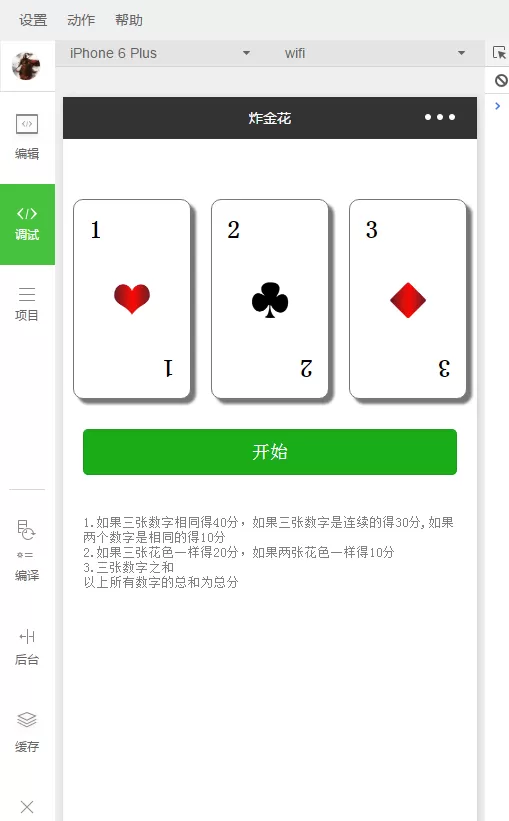
今天小编就带大家来共同学习如何在微信小程序上制作炸金花?希望可以帮助到有需要的小伙伴哦,下面就是详细完整的操作步骤。
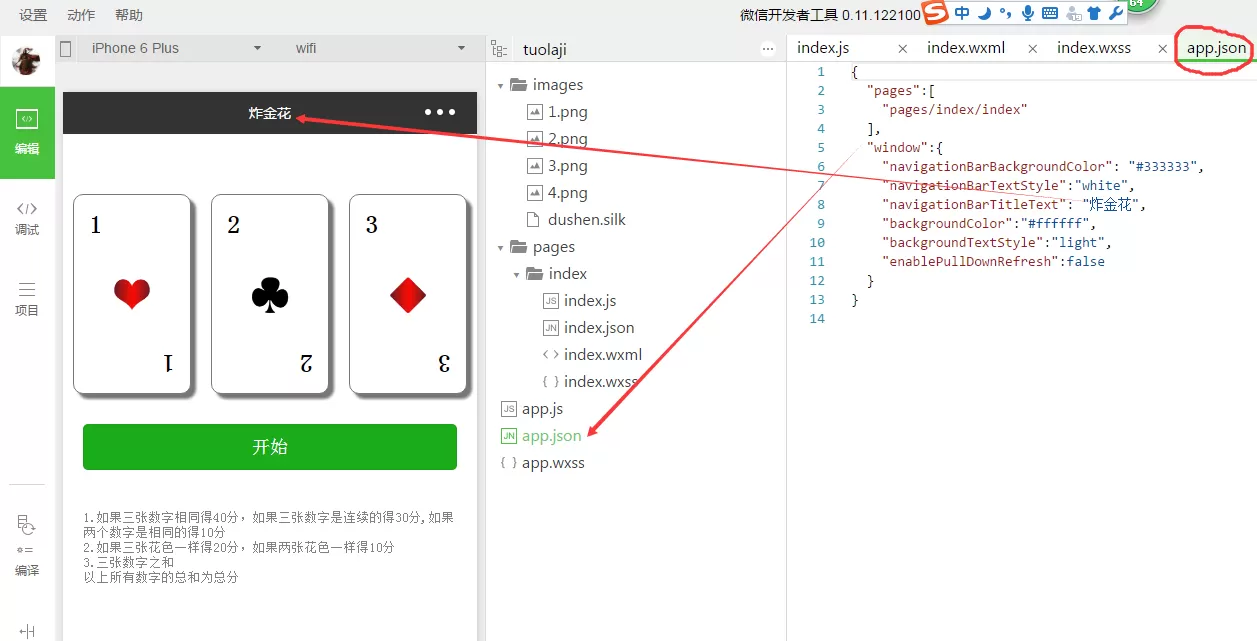
app.json:
{
"pages":[
"pages/index/index"
],
"window":{
"navigationBarBackgroundColor": "#333333","navigationBarTextStyle":"white",
"navigationBarTitleText": "炸金花",
"backgroundColor":"#ffffff",
"backgroundTextStyle":"light",
"enablePullDownRefresh":false
}
}
index.js
Page({
data:{
num1:1,
num2:2,
num3:3,
imgNum1:1,
imgNum2:2,
imgNum3:3,
b1:"white",
b2:"white",
b3:"white",
flag:true,
butype:"primary",
butext:"开始",
hidden:true,
score:0
},
start:function(){
var that=this;
that.setData({
butype:"default",
butext:"停止"
})
if(this.data.flag){
this.go=setInterval(function(){
that.setData({
num1:Math.ceil(Math.random()*10),
num2:Math.ceil(Math.random()*10),
num3:Math.ceil(Math.random()*10),
imgNum1:Math.ceil(Math.random()*4),
imgNum2:Math.ceil(Math.random()*4),
imgNum3:Math.ceil(Math.random()*4),
b1:"#"+Math.floor(Math.random()*1000000),b2:"#"+Math.floor(Math.random()*1000000),b3:"#"+Math.floor(Math.random()*1000000)
})
},100)
this.setData({
flag:false,
hidden:true,
score:0
})
}else{
clearInterval(this.go)
this.setData({
flag:true,
butype:"primary",
butext:"开始",
b1:"white",
b2:"white",
b3:"white"
})
var n1=this.data.num1;
var n2=this.data.num2;
var n3=this.data.num3;
var img1=this.data.imgNum1;
var img2=this.data.imgNum2;
var img3=this.data.imgNum3;
var result=n1+n2+n3;
if(img1==img2&&img2==img3){
result+=20;
}else if(img1==img2 || img2==img3 || img1==img3){result+=10;
}
var newarr=new Array();
newarr.push(n1)
newarr.push(n2)
newarr.push(n3)
for(var i=0;i for(var j = i + 1;j if(newarr[i]>newarr[j]){ var tmp = newarr[i]; newarr[i] = newarr[j]; newarr[j] = tmp; } } } if(((newarr[2]-newarr[1])==1)&&((newarr[1]-newarr[0])==1)){result+=30; }else if(newarr[2]==newarr[1] || newarr[2]==newarr[0] || newarr[0]==newarr[1]){result+=10; }else if(newarr[2]==newarr[1]&&newarr[2]==newarr[0]){result+=40; } this.setData({ hidden:false, score:result }) } }, onShareAppMessage: function () { return { title: "大小之争", desc: \'激烈的竞技游戏\', path: \'/pages/index/index\' } } }) ndex.wxml: index.wxss: .container{width:30%;height:200px;position:relative;border:1px solid #787775;box-sizing:border-box; display: inline-block;flex:1;margin:10px;border-radius:10px;box-shadow: 5px 5px 3px #787775} .text{width:30px;height:30px;position:absolute;top:15px;left:15px;font-size: 25px;font-weight: bolder} .img{width:50px;height:50px;position:absolute;top:50%;left:50%;margin-left:-25px;margin-top:-25px} .text1{width:30px;height:30px;position:absolute;bottom:15px;right:15px;font-size: 25px;font-weight: bolder;transform: rotate(180deg)} 以上就是如何在微信小程序上制作炸金花的全部内容了,大家都学会了吗?





- 怎么在AutoCAD中查看全部的内容?
- 别弃我2026-08-03 00:31:12

- 如何在AutoCAD中选框选图形?在AutoCAD中选框选图形的方法
- 栗子2026-08-03 00:31:10

- 如何在AutoCAD中画箭头符号?
- 对味2026-08-03 00:30:52

- 怎么在AutoCAD中绘制三维立体室内图?
- 别认怂2026-08-03 00:30:48

- 怎么给AutoCAD中的3d图形填充颜色?
- 花心症2026-08-03 00:30:42

- 如何解决AutoCAD启动很慢的问题?
- 凉人心2026-08-03 00:30:38
- QQMac版如何修改备注?QQMac版修改备注的方法
- 留井2026-08-03 00:30:35
- QQ手机版怎么取消个性签名与空间同步?
- 何必等2026-08-03 00:30:31

- 如何在AutoCAD中设置底图?AutoCAD设置底图的方法
- 阑珊2026-08-03 00:30:31

- QQ手机版如何设置井柏然字体?设置井柏然字体的方法
- 棼谷2026-08-03 00:30:28