如何使用微信小程序简单快速的定咖啡?
下面的这篇文章是教大家如何使用微信小程序简单快速的定咖啡?教程简单易学,有需要的小伙伴就赶紧和小编一起来学习吧。
话不多说,先上效果图:
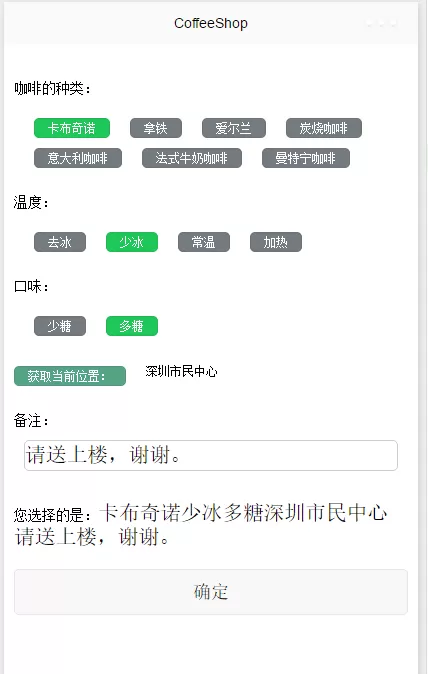
先上代码:
html
{{address}}
{{selectedCoffee}}{{selectedTemperature}}{{selectedTake}}{{address}}{{remark}}
css代码:
.content{
margin: 10px 0;
padding: 0 10px;
}
.title{
position: relative;
font-size: 14px;
}
.kindlist{
margin:10px 20px;
}
.kindbtn{
height:20px;
line-height: 20px;
font-size: 12px;
width: auto;
float: left;
position: flex;
margin-right: 20px;
margin-top: 10px;
color: #fff;
}
.clear{
clear: both;
padding-top: 20px;
}
.remarkinput{
border: 1px solid #ccc;
margin: 10px;
border-radius: 5px;
}
.selected{
background: red;
}
.gray{
background: #747B80;
}
.red{
background: #1FC659;
}
.addr{
font-size: 12px;
}
.addr-btn{
background: #54a384;
}
js代码:
//index.js
//获取应用实例
var app = getApp()
Page({
data:{
select:\'-1\',
select1:\'-1\',
select2:\'-1\',
coffeeList : [
{id:1,coffee:"卡布奇诺"},
{id:2,coffee:"拿铁"},
{id:3,coffee:"爱尔兰"},
{id:4,coffee:"炭烧咖啡"},
{id:5,coffee:"意大利咖啡"},
{id:6,coffee:"法式牛奶咖啡"},
{id:7,coffee:"曼特宁咖啡"}
],
temperatureList : [
{id:1,temperature:"去冰"},
{id:2,temperature:"少冰"},
{id:3,temperature:"常温"},
{id:4,temperature:"加热"}
],
takeList : [
{id:1,take:"少糖"},
{id:2,take:"多糖"}
]
},
selectCoffee:function(e){
console.log(e.target.dataset.num);
this.setData({
select:e.target.dataset.num,
selectedCoffee:e.target.dataset.id
});
},
selectTemperature:function(e){
this.setData({
select1:e.target.dataset.num,
selectedTemperature:e.target.dataset.id
});
},
selectTake:function(e){
this.setData({
select2:e.target.dataset.num,
selectedTake:e.target.dataset.id
});
},
bindKeyInput: function(e) {
this.setData({
remark: e.detail.value
})
},
getAddr: function(){
var that = this;
wx.chooseLocation({
success: function(res){
var point = {
latitude: res.latitude,
longitude: res.longitude
};
that.setData({
address : res.name || res.address
});
},
fail: function(res) {
console.log(res);
},
complete: function(res) {
console.log(res);
}
})
}
})
以上就是如何使用微信小程序简单快速的定咖啡的全部内容了,大家都学会了吗?










- 怎么在AutoCAD中查看全部的内容?
- 别弃我2026-08-03 00:31:12

- 如何在AutoCAD中选框选图形?在AutoCAD中选框选图形的方法
- 栗子2026-08-03 00:31:10

- 如何在AutoCAD中画箭头符号?
- 对味2026-08-03 00:30:52

- 怎么在AutoCAD中绘制三维立体室内图?
- 别认怂2026-08-03 00:30:48

- 怎么给AutoCAD中的3d图形填充颜色?
- 花心症2026-08-03 00:30:42

- 如何解决AutoCAD启动很慢的问题?
- 凉人心2026-08-03 00:30:38
- QQMac版如何修改备注?QQMac版修改备注的方法
- 留井2026-08-03 00:30:35

- QQ手机版怎么取消个性签名与空间同步?
- 何必等2026-08-03 00:30:31

- 如何在AutoCAD中设置底图?AutoCAD设置底图的方法
- 阑珊2026-08-03 00:30:31

- QQ手机版如何设置井柏然字体?设置井柏然字体的方法
- 棼谷2026-08-03 00:30:28